
Instructions
To make this component work you must follow these steps:
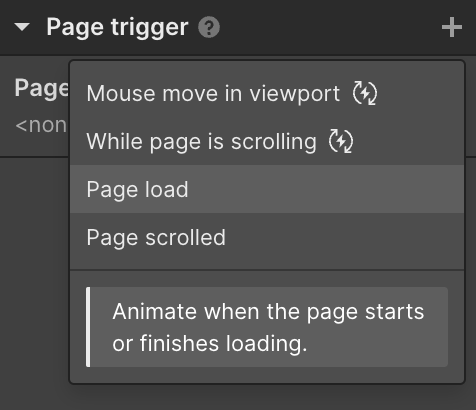
  1. Add a Page trigger and select Page load
  2. Select the Loader 3 [Hide] animation inside When page finishes loading
  3. Position loader3_component inside page-wrapper
  4. Set loader3_component position to fixed and display to none
Dropdown menu titled 'Page trigger' with options: Mouse move in viewport, While page is scrolling, Page load, and Page scrolled, with a description explaining to animate when the page starts or finishes loading.
Note:
Sometimes there may be a bug where the website briefly flashes before the loader is displayed. To avoid this add the following custom code in your Site settings > Custom Code > Head code
<style>
 .preloader {
   display: flex;
 }
</style>

Blog – Brand and Web Trends
that are hot right now

Hej – wollen wir Freunde sein? Schau doch mal in meinen Blog oder sag “Hi”  bei Linkedin:
Möchtest du über ein konkretes Projekt sprechen?
Nochmal weiter schauen? Klar. Schau dir hier meine Leistungen im Detail an, um mehr zu erfahren:
Let’s stay in Touch: Bock mich zu stalken oder aus meinen Gedanken zu lesen?